
A good monitor setup saves your eyes and neck. Staring at a small, blurry screen all day is tiring. It can even cause mistakes if you’re squinting or scrolling too much.
The right monitors give you room. You can keep your main chart in front, put your order tickets to the side, and watch news feeds on another screen. You see it all without a mess of windows.
This is your first big decision. Two separate monitors are flexible. You can angle them how you like. If one breaks, you still have a screen to work with. The downside is the bezel in the middle.
A single ultrawide monitor gives you one clean view. But managing windows can be a hassle, and charts can get lost on the far edges. If that one screen fails, you’re out of luck.
For most traders, starting with two standard monitors is the easier, more reliable choice. You can always add a third screen later.
Ignore the hype about high refresh rates and curves. Focus on these four things.
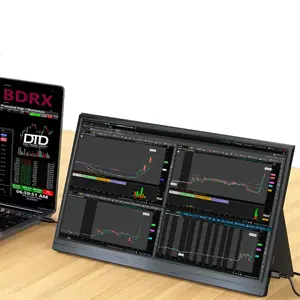
A 27-inch monitor is the sweet spot. It’s big enough to see details but won’t take over your desk. Pair it with 2560 x 1440 resolution (called 1440p or QHD). This gives you sharp text and plenty of space for your apps.
24-inch screens feel cramped for multiple charts. 32-inch screens are large and often need 4K, which can make text too small. 27-inch 1440p is the balanced, practical choice.
Get an IPS panel. IPS screens have the best colors and viewing angles. The image looks right even if you view it from the side. This is important when you have two or three monitors angled toward you.
Skip VA panels for trading. Their colors shift more when viewed off-center. TN panels are fast for gaming but have poor colors and viewing angles.
Look for 75Hz to 100Hz. This is smoother than the standard 60Hz, which helps reduce eye strain when you’re watching numbers and charts all day. You don’t need 144Hz or higher. That’s for gamers.
A monitor stand that adjusts for height, tilt, and swivel is very useful. It lets you set the screen at the right height for your posture. If the stand it comes with is poor, plan on getting a monitor mount.
Your computer needs the right ports to run your monitors. For two 1440p monitors at 75Hz, a modern graphics card or a recent laptop with decent integrated graphics can handle it.
Check your computer’s video outputs. You’ll likely see HDMI or DisplayPort. DisplayPort is often better for high resolutions. If your laptop only has USB-C, you may need a dock or some adapters.
Make sure your computer isn’t too old. Trying to run two high-resolution screens on an ancient machine can make everything slow.
A good mount makes a huge difference. It clears desk space and lets you position your screens perfectly.

A dual monitor arm is a great buy. It holds both screens off the desk. You can move them up, down, and side-to-side until they feel just right. Get one with cable management to hide the wires.
If you don’t want an arm, make sure your desk is deep enough. A 27-inch monitor on its stand needs to sit back, or it will feel too close. A deeper desk (30 inches or more) is more comfortable.
Before you buy big monitors or a mount, measure your desk. For two 27-inch monitors side-by-side, your desk should be at least 55 to 60 inches wide.
For depth, if you’re using the monitor’s own stand, aim for a desk depth of 30 inches minimum. If you use a monitor arm that clamps to the back, you can use a slightly shallower desk, since the screens can be pushed back.
Also check that your desk can support a clamp. Some cheap desks have a thin back panel that can’t handle the pressure. A grommet mount (which goes through a hole in the desk) is another option.
Use the right cable for the best picture. For a 1440p 75Hz monitor, a good HDMI cable (like HDMI 2.0) or a DisplayPort cable will work. The cable in the box is usually fine.

If you’re using a mount, buy cables a bit longer than you think you need. This gives you slack to route them neatly through the arm. A tangled mess of cables behind your desk is annoying and looks bad.
Plan your power cords too. You’ll need a power strip or surge protector with enough outlets for both monitors and your computer.
Here’s a common, effective setup. Get two 27-inch IPS monitors with 1440p resolution and 75Hz refresh rates. Mount them on a dual monitor arm clamped to a 60-inch wide desk.

Run DisplayPort cables from each monitor to your desktop’s graphics card. Route the cables through the arm to keep them tidy. Set the monitors at eye level, about an arm’s length away.
Put your main trading platform on the left screen. Keep your charts and scanners on the right. It’s simple, clean, and works without costing a fortune.
People often buy monitors that are too small. A 24-inch screen seems okay at first, but you’ll quickly want more space.
Another mistake is ignoring ergonomics. Setting monitors too high or too low leads to neck strain. The top of your screens should be at or just below eye level.
They also forget to check if their computer can run the screens. An old laptop might only support one external monitor. Always check your computer’s specs before you buy.
Usually not. 4K on a 27-inch screen is very sharp, but text and icons get tiny. You have to use scaling in Windows or macOS, which can cause problems with some software. 1440p is a better balance of sharpness and usability.
Most active traders do well with two or three. Start with two. If you’re constantly swapping windows, think about adding a third. There’s no prize for having the most screens.
Not a “gaming” card, but you need a card with enough outputs. A modern, mid-range card or a recent CPU with integrated graphics can usually run two or three 1440p monitors. Just check for the number of DisplayPort or HDMI outputs.
They can be, especially on very wide ultrawide screens. A slight curve brings the edges closer. For standard 27-inch flat screens in a multi-monitor setup, a curve isn’t needed and can look strange when angled.
Look for a monitor rated around 300 to 350 nits. This is bright enough for a room with normal lighting. If you have a very bright window behind you, you might need more. Too much brightness in a dark room strains your eyes.
Monitor technology for our needs improves slowly. The 27-inch 1440p IPS category is very mature. A good model from 2024 or 2025 will still be great in 2026. Buy when you need it, don’t wait for a minor spec bump.
If you’re on a tight budget, see our guide on Best Budget Monitors for Day Traders in 2026. For more on arranging screens, Building an Ergonomic Multi-Monitor Setup for Day Traders has good tips. Your desk matters too. We have advice on Choosing the Right Trading Desk for Your Setup.
Picking trading monitors doesn’t need to be hard. Stick to the basics: 27-inch size, 1440p resolution, IPS panel, and a 75Hz refresh rate. Get two of them and put them on a solid mount.
This setup gives you a clear, comfortable view of the markets. It works with most computers and desks. You can focus on your trading, not your gear. That’s the whole point of good screens and monitors.
Spend your time analyzing charts, not comparing endless specs. A simple, reliable monitor setup is one of the best investments you can make for your trading day.