
For day traders, screen real estate is a critical tool of the trade, but it doesn’t have to break the bank. As we look ahead to 2026, the market for budget monitors offers more power and practicality than ever before. This guide is dedicated to finding the best affordable monitors that deliver the clarity, reliability, and multi-screen capability essential for tracking charts, news feeds, and order books without compromising your capital. We’ll cut through the specs to focus on what truly matters for your trading desk setup.
A proper monitor setup is not a luxury; it’s a necessity for effective market analysis and risk management. On a budget, the goal is to maximize functional space and reduce eye strain during long sessions. The right affordable monitors allow you to have dedicated screens for your trading platform, watchlists, and economic calendars, minimizing disruptive window switching. This organized workflow can lead to faster reaction times and fewer costly errors, proving that a smart, cost-effective investment in your screens and monitors directly supports your trading performance.
Choosing the right monitor means understanding which features are non-negotiable and which are nice-to-have. For day trading in 2026, focus on these core attributes when shopping on a budget.

Aim for 24-inch to 27-inch monitors. This size range offers a great balance of screen space and pixel density without commanding a premium price. The sweet spot for resolution is 2560 x 1440 (QHD/2K). It provides significantly more workspace than 1080p Full HD, allowing for sharper text and more chart windows, and it has become the new standard for budget-conscious productivity monitors.
Always choose an IPS (In-Plane Switching) panel. IPS offers superior color accuracy and wide viewing angles compared to older TN or VA panels. This means the chart colors and data remain consistent even when you view the screen from the side, which is crucial if you’re using a multi-monitor array. The price gap for IPS has virtually disappeared in the budget category.
A standard 60Hz refresh rate is perfectly adequate for trading applications. You don’t need a high-refresh gaming monitor. For response time, look for 5ms or lower (GTG) to prevent ghosting or smearing when scrolling through fast-moving tickers or charts.
Ensure the monitor has at least two modern video inputs, like HDMI and DisplayPort, for flexible connectivity. A VESA mount compatibility (75x75mm or 100x100mm) is absolutely essential. This allows you to use affordable, space-saving monitor mounts to create a seamless multi-screen setup. Built-in ergonomic stands with height, tilt, and swivel adjustment are a bonus but often add cost.
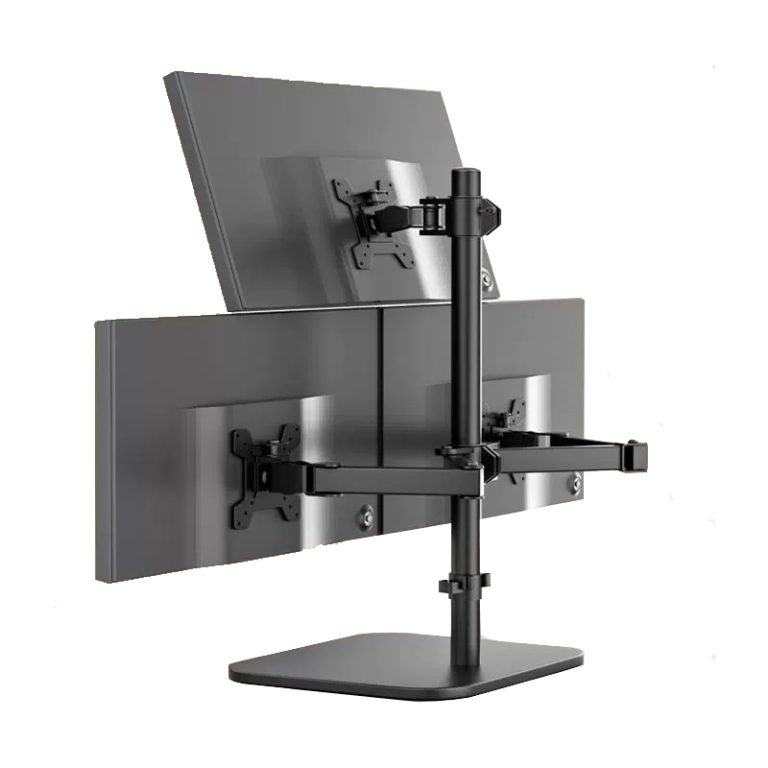
Your monitors are only as good as their placement. A proper mount is the secret weapon of an efficient, budget-friendly trading desk.

Budget setups can be derailed by overlooked connectivity issues. Most new budget monitors will include a basic HDMI cable, but it’s often short and of mediocre quality.

Here’s a practical, cost-effective three-monitor setup you could build in 2026:
Is 1080p still acceptable for day trading in 2026?
While usable, 1080p on screens larger than 24 inches shows noticeable pixelation. Given the prevalence and affordability of 1440p panels, we recommend 1440p as the new minimum for a professional trading workflow where screen clarity reduces eye strain.
Can I mix and match different budget monitor models?
You can, but for the best experience, try to use identical models. Matching models ensure consistent color, brightness, and bezel size, creating a seamless viewing canvas. If mixing, at least stick to the same brand, panel type (IPS), and resolution.
How many monitors do I really need to start?
Two monitors is a powerful starting point: one for your main trading chart and one for your watchlist, scanner, or broker platform. A third monitor dedicated to news and macroeconomic data is a logical and highly beneficial upgrade.
Do I need a special graphics card for three 1440p monitors?
Most modern integrated graphics (Intel Iris Xe, AMD Radeon Graphics) and entry-level dedicated GPUs can drive three 1440p displays for basic desktop use, which includes trading applications. Always verify the specific port capabilities and maximum supported resolution of your GPU.
Are curved monitors good for budget trading setups?
In the budget segment, curved monitors often force a compromise on panel quality (VA over IPS) and add cost. A flat IPS panel offers better overall value, color accuracy, and viewing angles for a multi-screen setup.
Building a high-functioning monitor setup for day trading in 2026 is entirely achievable on a sensible budget. The key is to prioritize the right specifications-primarily IPS panels, 1440p resolution, and VESA compatibility-over flashy gaming features. By pairing carefully selected monitors with a robust mounting solution and planning your connectivity, you create a professional-grade command center that enhances your market awareness and decision-making speed. This strategic investment in your workspace is one of the most tangible ways to support your trading discipline and long-term success, without requiring a massive upfront capital outlay.