What you get
You get four monitors positioned around your laptop in one clean setup. Screens stay aligned, and your desk stays clear of separate monitor bases.
This quad screen laptop workstation mount is built for laptop‑first desks that need a stable four‑display layout. If you are looking for a 4 monitor laptop mount, this gives you one system instead of four separate stands.
It suits a multi-monitor workstation workflow where charts, research, and communication tools stay visible at the same time. Many traders use it as a 4 screen monitor mount for trading desk setup to reduce window switching during sessions.
If you plan to expand later, this can be a stepping stone toward a six screen mount. It also matches a trading desk mount approach where the desk surface stays clear and screens sit closer to eye level.
If you run lightweight portable displays that use standard mounting holes, this can support a portable monitor mount style build. Confirm screen weight and mounting holes before you lock in your build.
For matching parts, browse Desk Arms & Mounts, add leads from Cables & Connectivity, and choose displays in Screens & Monitors.
Choose your base type
Pick the base that matches your desk and how permanent you want the install to be.
- Clamp: fast desk‑edge install with no drilling
- Grommet mount: bolt‑through mounting for a cleaner install and stronger hold
- Base plate: freestanding weighted base for desks where clamping or drilling is not a fit
If you want maximum rigidity, grommet mounting is usually the most stable option. If you move your setup often, the base plate may be easier to live with.
Compatibility checks
Before install, confirm your monitors match the mounting hardware and your desk can support the base you choose.
- Check your screens for 75×75mm and 100×100mm mounting hole patterns
- Check each monitor weight, including any adapters you plan to use
- Check desk thickness for a clamp, or hole clearance for a grommet mount
- Decide on landscape or portrait before final tightening so cable runs stay clean
Example check: if you plan a four‑screen wall, mount two monitors first, set height and spacing, then add the remaining two. This keeps the arms balanced and reduces rework.
Adjustment and comfort
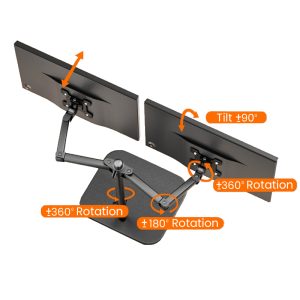
Each arm supports tilt, swivel, and rotation so you can fine‑tune viewing angles. You can run a flat wall of screens, or angle the outer monitors toward your seating position.
With four monitors, small angle changes matter. A few degrees can reduce head movement and feel more comfortable during long sessions.
Example layout: keep primary charts on the two centre monitors, watchlists and scanners on the left, and news and communication on the right. This keeps your workflow consistent inside a multi-monitor workstation layout.
Setup tips
- Install the base first, then build the centre structure before you add the outer arms
- Mount the heaviest monitors closest to the centre pole for better stability
- Route power and video leads before final tightening so cables do not pull on the arms
- After mounting, recheck clamp tension or grommet tightness after the first day of use
If you use portable displays that do not have mounting holes, you may need a model‑specific adapter. Confirm that before you buy hardware.
What is included
- Quad‑screen mount structure, 4‑arm configuration
- Base type selected at checkout, Clamp or Grommet mount or Base plate
- Standard mounting hardware included with the mount
Note: monitors and laptop are not included.
Next step
Next step: confirm your desk can support your base option, check your monitors for 75×75mm and 100×100mm mounting hole patterns, then plan your cable runs from Cables & Connectivity before you lock the arms in place.
A simple way to avoid wobble is to set height first, angle outer screens second, then tighten everything last. That order usually keeps the setup straighter from day one.