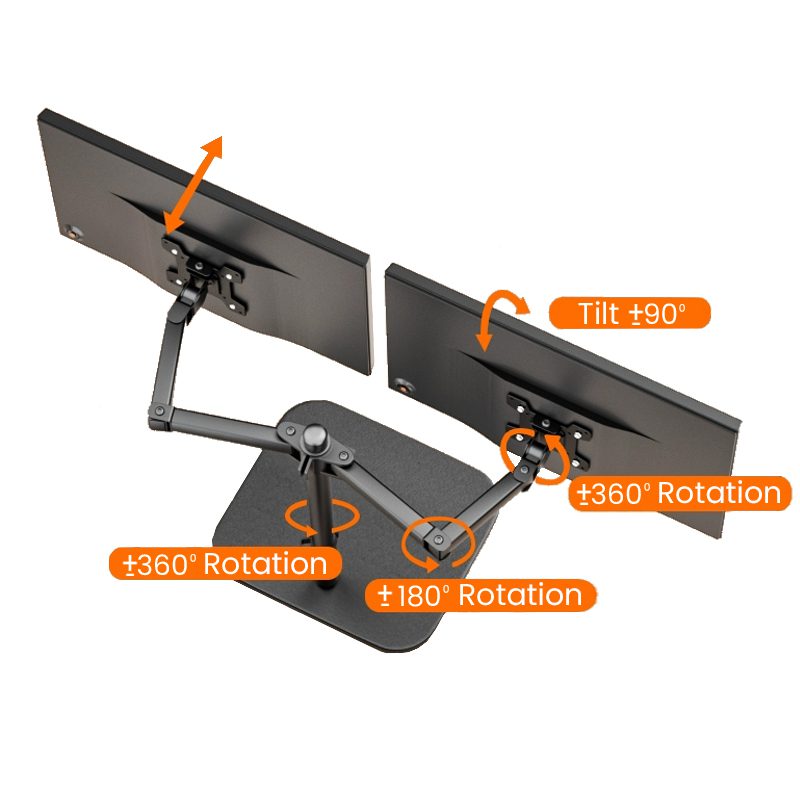
What you get
You get two external screens at a usable height, with your laptop centered underneath. That keeps your desk cleaner and your layout consistent.
This dual screen laptop mount is a laptop workstation mount made for laptop‑first setups that need two monitors, left and right.
This is mount only. Laptop and monitors are not included.
It supports monitors from 14–27 inches and leaves up to about 730 mm of space between screens. That spacing lets most laptops sit beneath or between the displays, depending on how you position the arms.
If you want a dependable 2-screen laptop setup for trading, you can keep charts on one side and order tools, news, or a watchlist on the other.
Many traders use it as a laptop trading monitor stand because it removes two bulky monitor bases from the desk and holds the screens in a stable working position.
If your portable screens use standard mounting holes, it can also work as a portable monitor dual mount. That lets you fix portable displays in place, provided the screen matches the mount plate and load limits.
This helps build an ergonomic laptop trading setup. You can raise the monitors and match their height to your viewing position rather than staring down at a desk.
If you plan to expand later, it fits into a larger multi-monitor workstation build. It can sit alongside options like a trading desk mount. Some traders use it as a step before moving to a six screen mount layout.
For related parts, browse Desk Arms & Mounts and matching displays in Screens & Monitors.
Key benefits
- Two monitors left and right while your laptop stays centered
- More usable desk space by removing bulky monitor bases
- Flexible positioning so you can match height and angle
- Works with 14–27 inch screens for common home and office monitors
- Cable routing clips help keep power and video leads tidy
Monitor size and spacing
This mount supports monitors from 14–27 inches. It leaves up to about 730 mm of usable space between screens, which is useful when you use a larger laptop.
Example: with two 24-inch monitors, you can usually keep your laptop in the center and still open the lid normally. That gives you a practical 3-screen workflow without needing a deep desk.
Adjustment and movement
- Tilt range: ±90°
- Screen rotation: 360°
- Arm rotation: 360° at the joints
- Central joint sweep: 180°
- Height adjustment: slide the arms up or down the center pole
Use these adjustments to line up both monitors with your laptop screen. That is helpful if you want one monitor in portrait and the other in landscape.
Mounting hole patterns
This mount supports 75×75mm and 100×100mm mounting hole patterns. It may also work with common 2‑screw and 4‑screw layouts used on some portable or lightweight monitors, as long as the screen matches the plate and stays within the load limit.
Load capacity and construction
- Load rating: up to 9 kg per arm, up to 18 kg total depending on configuration
- Build: steel arms, reinforced joints, height‑adjustable pole
- Stability: designed to reduce wobble during typing and active mouse work
- Cable management: integrated routing clips
For the steadiest feel, keep heavier monitors closer to the center pole and choose the most rigid base option your desk allows.
Base options
Clamp Base: clamps to the desk edge without drilling. This is the fastest install for most desks.
Grommet Mount: bolts through an existing cable hole cut‑out. This is usually the most rigid option when you can use it.
Weighted Base Plate: a freestanding metal base that needs no drilling or clamping. This can suit glass desks, rental setups, or desks where clamping is not possible.
For cable planning and clean routing, add the right leads from Cables & Connectivity.
Recommended use cases
- Laptop day trading setups
- Remote work and home office desks
- Programming and multi‑window workflows
- Portable monitor users who want a fixed position
You can run both monitors horizontal, rotate one to portrait, or angle both inward to reduce head movement across the desk.
Package contents
- 1 × Centre pole
- 2 × Adjustable monitor arms
- 2 × Monitor mounting plates
- 1 × Chosen base, clamp or grommet or weighted plate
- Full screw and spacer kit
- Allen‑key tool
- Installation guide
Compatibility and next step
Mount compatibility depends on your screen size, weight, and mounting hole pattern. Video connections such as HDMI or USB‑C depend on your laptop, docks, and adapters, not the mount.
Next step: confirm your monitors fit the 14–27 inch range, check for 75×75mm and 100×100mm mounting hole patterns, pick your base option, then install the pole and arms before you mount the screens.
Missing info: desk thickness range for the clamp, maximum pole height, and exact spacing range across different arm positions.